see only this page or (why?) make a Split-Screen Pair
 
Mini-Page
two kinds of Essential Actions: Design Cycles to Generate-and-Evaluate, plus 3 Evaluative ComparisonsThis “miniature HomePage” is written for fellow educators, to help you learn on three levels:
       • in a Summary and Basic Overview you will quickly understand the main ideas and “big picture”, then
       • an Expanded Overview gives you explanations that are more thorough (yet still fairly brief)* and sometimes extra “added value” ideas, and it links to
       • corresponding parts of the HomePage for your wider-and-deeper explorations.
 
     At each level you will construct better understandings of the key ideas, plus a fuller “big picture” of how the ideas form a coherent system-for-education with mutually supportive parts.
 
   * Your time is valuable, so my goal is to help you learn a lot in a little time (with a high ratio of “your learning / your time”) by making my explanations thorough yet brief.  I want to help you use your time more effectively, and thus — because “time is the stuff life is made of ” (Ben Franklin) — use your life more effectively.


an option:  You can skip this gray box — with "about me... everything is free... Viewing Tips" — and go to the Summary.
 

about me:  I'm an enthusiastic educator (with a PhD in C & I ) who wants to find co-enthusiasts so we can learn from each other by discussing my ideas & your ideas, and your goals.  { networking bio }    /   contact - Craig Rusbult <craigru57@yahoo.com>


everything is free:  The ideas in this website are free ( i.e. I don't want any payment for anything) but are copyrighted although I want you to freely use everything because I want us to improve our Education for Problem Solving.


Viewing Tips:  Your experience will be much better if you view on a monitor and (if it's necessary) put this section on the right side or (if there is no "right side") make a Split-Window Pair with the website's HomePage on the left side;  this Mini-Page is on the right side because most of its links* open on the left and (on the right) this page remains open so you can continue reading it – while seeing both pages! – without using the Back-Button.  But if you do use it, the Back-Button will work properly for all content on both sides;  and in another way the Left-Right Pair “behaves normally” you can scroll each side independently.

    But if you're viewing on a small screen, use a link – at top of page, or here – to see only this page (in its own full-width window so the text is larger) and every link will open in a new window.


    * links with a blue background open a section in the HomePage, and regular links (with no background color) open a section inside this page.


Summary

This is a brief “big picture” overview of essential ideas in my website about Education for Problem Solving, with links (that open on the left side) to sections in the longer Basic Overview.


two ways to learn more:  How?  We can help students get more Experiences with Problem Solving, and LEARN MORE from their Experiences.  How?  They can use my model for Design Process (for Design-Thinking Process that is Problem-Solving Process) to promote educationally valuable cognitive-and-metacognitive Thinking Strategies by Coordinating Their Process, and asking Self-Questions for Self-Regulated Learning.     { more: You'll find additional insights – about helping students “get more & learn more” and skillfully use metacognition in the Basic Overview. }

the benefits of metacognition:  Abundant research shows that when students use metacognition it's highly effective for helping them improve their academic skills — in many kinds of Learning and Performing that include scores on standardized exams — and social-emotional skills.


how you can understand the model :  You can learn from Your Discoveries (in Basic Overview) and from My Explanations (in Expanded Overview), and also do Recognition Learning when you see familiar Actions and recognize that Design Process is Your Process, is the process you use – naturally and intuitively, in everyday life – to Solve Problems by Making Things Better.

how students can learn the model :  When students get Problem-Solving Experiences and then Reflect on their Experiences, they will discover Principles for problem-solving Design Thinking, so Experiences + Reflections ➞ Principles.  Then you can help them understand the model more deeply with Their Discoveries and Your Explanations;  and Their Recognitions will be easier due to their previous Experiences-and-Reflections.  During the entire progression (in the parts & whole) you will be helping them use a Process-of-Inquiry to discover Principles-for-Inquiry.


logical organization of Process:  My model for problem-solving Design Thinking uses verbal-and-visual representations to logically organize the creative-and-critical Thinking Actions that people intuitively use for Problem Solving (PS) when we Design Solutions to Solve Problems by Making Things Better.

two Wide Scopes:  There are logical reasons to think that most people use a similar (but not identical) General Process for most things we do in life, AND that this General Process is accurately described by my model for Design Process.*  This gives the model two Wide Scopes – for PS-Process and for PS-Activities – because most people use a similar Process for most things we do.    { iou – July 17, I'll describe how the Wide Scope for PS-Process also includes PS-Actions we do with subconscious processing. }    /   One reason for the Wide Scope of PS-Activities occurs when we choose to use a broad definition of problem — it's any opportunity to make something better, in any area of life — so a student's Problem-Solving Activities include most things they do in life.  They are problem solving (verb) whenever they are trying to make something better, and they are a problem solver (noun) whenever they do make something better.

using modular flexibility:  Design Process is built from simple Thinking Actions (generate, evaluate, do, imagine, compare,...), and this modular structure gives it a modular flexibility so we can use these simple PS-Actions to describe the complex PS-Process for a wide variety of PS-Activities.  How?  It's analogous to how modular flexibility lets us combine simple Lego Bricks to construct many kinds of complex Lego Structures.


teaching to increase Transfers:  Three main features of Design Process (it has Wide Scopes for Activities & for Process, is logically organized) let us design-and-use instruction — by teaching the model in multiple contexts in a generalized form for deep understandingthat increase Transfers of Learning-and-Performing both Across Areas (in School & in Life) and Through Time (from Past to Present and into Future).

building motivational Transfer-Bridges:  When we explain how using Design Process increases Transfers, this will help students imagine Transfer Bridges (Across Areas into Their Life, and Through Time into Their Future) so they believe that Skills-in-School will become Skills-in-Life, that improving their School Learning will improve their Life Living, will improve their Future in ways they want, will help them achieve their whole-person Goals for Life, thus motivating them to invest in their Personal Education.

Bridges + Metaphors + Adventures:  You can motivate students with...  • Transfer Bridges and   • Metacognitive Metaphors by encouraging each one to metacognitively “Drive Your Brain” (and Increase its ‘Horsepower’)* and “Be CEO of Your Thinking” and   • Thinking Adventures by inviting them to explore the fascinating world of thinking when they LEARN Thinking Strategies (for Cognition-and-Metacognition and to Combine Models-for-Thinking) and USE Thinking Strategies for Thinking Activities.     { * useful analogies:  Horsepower & Brainpower, Growth Mindset-plus-Actions for Muscles & Brain }


iou – There will be some revisions (above) and maybe a few more ideas (above & below) during July 17-21.


Basic Overview  (of website)
We can help students learn more from
their experiences with Problem Solving,
and be more motivated to learn when they
build Transfer-Bridges from School into Life.
 

help students learn more:  How?  We can help students get more Experiences (with Problem Solving, PS) and learn more from Their Experiences by using my model for Design Process, for a Design-Thinking Process that is Problem-Solving Process. 

help students be more motivated:  How?  You already know many ways, and one more is to show each student how we are helping them improve the Thinking Process they use for their Thinking Activities, for most things they do in their everyday life, by showing them the...


two wide scopes:  Why does using Design Process for Problem Solving (PS) produce educational benefits?  Two closely-related reasons are because Design Process has two Wide Scopes, for what students do (in their PS-Activities) and how they do it (with their PS-Process).  But these two Wide Scopes are "closely related" and sometimes it's more useful to think “it has one Wide Scope for Activities-and-Process.

Why?  The two Wide Scopes occur because...

     When educators choose to use a broad definition of problem — it's any opportunity to make something better, in any area of life — a student's Problem-Solving Activities include most things they do in life.  They are problem solving (verb) whenever they are trying to make something better, and they are a problem solver (noun) whenever they do make something better.  Generally, with this definition a Wide Scope also occurs in other Models for Problem Solving.  More specifically for Design Process,...

     The other Wide Scope occurs because most people use a similar (but not identical) General PS-Process for most of our PS-Activities (for most things we do), AND this General Process is described by Design Process in ways that are accurate and are educationally beneficial.

Together the two Wide Scopes form a single Wide Scope for Activities-and-Process that you can conceptualize as Activities-with-Process because most Activities are done with a similar Process.


 put section on right side 

understand Design Process by

learning from Your Discoveries


How?  You can first learn from Your Discoveries (below) and then learn from My Explanations (in the Expanded Overview).


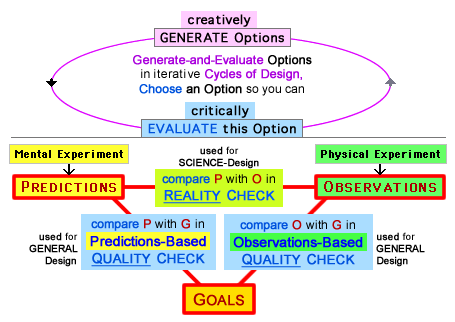
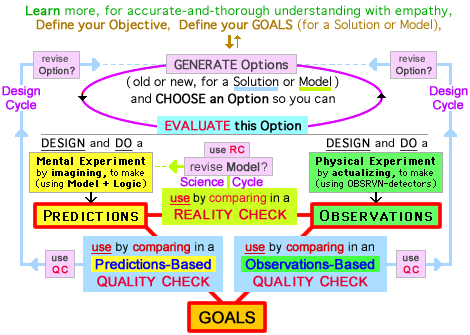
two kinds of Essential Action-Sequences: Design Cycles of Generation-and-Evaluation, plus 3 Evaluative ComparisonsHow?  Discover the main features of problem-solving Design Process by studying an Actions-Diagram` (the link puts it on left side).

After awhile, use these tips for two ways to learn – by Discovering and Recognizing:

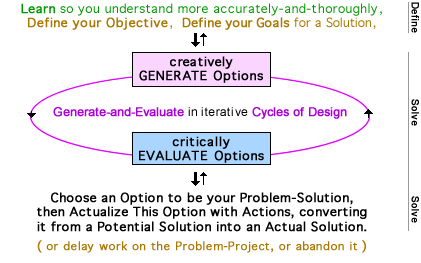
    • Discovery Learning:  To thoroughly study the diagram, observe (and think about ) its words & colors and spatial relationships,  find the Actions & logical structures* that produce two kinds of Essential Action-Sequences, one in the Top Part and another (with three variations, used for General Design & Science-Design) in the Bottom Part and solve a Mystery — “Why does the Cycle have a right-side arrow, pointing from Evaluate to Generate?” — and actively construct your understanding for how this “Why...” is a third kind of Essential Action-Sequence.    { * e.g. notice the art-and-logic in “3 Comparisons of 3 Elements” with symmetric spatial relationships, symbolic area colors for Elements (yellow-green-gold for P-O-G) and Comparisons (yellow-green, blue), and text colors (blue, red, black). }     /    When you also study an Overview-Diagram` – with a “big-picture overview” of Design Process – you will see (in its Top Text and Bottom Text) the PS-Actions that people do before, during, and after we do the PS-Actions of Generating Options and Evaluating Options.

    • Recognition Learning:  During your Discovery Learning you also can do Recognition Learning by asking yourself “do The Actions of Design Process (in its diagram) describe My Actions (in everyday life)?”  You will recognize familiar Actions, and you will realize that Design Process is Your Process;  it's the process you use – naturally and intuitively – to Solve Problems by Making Things Better.   But ...

     If you see "Experiments" and think “I rarely do experiments, so this is an unfamiliar Action,” you can use my broad definition:  in the context of Design Process, an Experiment is any situation that produces Experiences and provides an opportunity to make Predictions (by imagining in a Mental Experiment) or to make Observations (during the actualizing in a Physical Experiment ),  so any Prediction-Situation is a Mental Experiment , and any Observation-Situation is a Physical Experiment .   With this perspective – by thinking “Experiments produce Experiences” (and “I have Experiences”) – you will recognize that many (but not all) of your everyday Experiences happen due to “Experiments” that are done by yourself or by others.
 

In the Expanded Overview you also — in addition to learning from Your Discoveries and Your Recognitions — can learn from My Explanations for key features of Design Process:  how “3 Comparisons of 3 Elements” integrates Design Thinking with Science Thinking, so you're asking The Design Question with a Quality Check, and The Science Question with a Reality Check;   why The Mystery Answer is “Guided Generation”;   detailed descriptions of the three Essential Action-Sequences, in the context of Recognition Learning;   why we use Action Sequences (because they're useful), illustrated with an “isolation diagram” that clearly shows the most common Sequence;   and a little more.

 
 put section on right side 


The overview-title begins with a goal, to "help students learn more from their experiences with Problem Solving" and we can do this with...

two ways to learn more:  Students can learn more in two related ways, when they GET MORE PS-Experiences, and they LEARN MORE from these PS-Experiences by using my model for Design Process – i.e. for Problem-Solving Process plus other models (from d.school of Stanford,...) to promote metacognitive Thinking Strategies.    /    educational benefits:  Abundant research shows that when students use metacognition, this is highly effective for helping them improve their academic skills — to boost their Learning and Performing in many contexts, including their scores on standardized exams — and their social-emotional skills.

differences in the two ways:  The model for Design Process can directly help students LEARN MORE from Experiences, by promoting metacognition.  But its value is indirect for helping them GET MORE Experiences, when it helps them recognize that most of their Experiences are PS-Experiences so they will be metacognively aware more often, and this frequent metacognition will help them LEARN MORE.


Cognitive-and-Metacognitive Thinking Strategies


How?  The essential foundation of metacognition is for you (or a student) to “observe your thinking,” but you also can think about (reflect on) and evaluate so you can regulate (adjust) as in the Self-Regulation of Self-Regulated Learning.  During an activity, your skillful metacognition could be doing none or some or all, with five levels:

      0 )   none,

      1 )   observe,

      2 )   observe  +  ( think about ),

     3a)    observe  +  ( think about  &  evaluate ),

     3b)    observe  +  ( think about  &  evaluate-and-regulate ).


Why?  Because skillful Regulation by Metacognition requires skillful Regulation of Metacognition.  How?  In a particular situation you might decide to stimulate higher-quality Learning by using metacognition of a particular type, in a particular way (re: its amount, timing,...).  But at other times you will want to “go with the flow” by just thinking-and-doing (instead of thinking about thinking) to allow higher-quality Learning by avoiding metacognition.


You can Regulate your Thinking (and Feeling)* — for Whole-Person Self-Regulation by Using Metacognition — with the intention of Achieving Whole-Person Goals, with Goal-Oriented Metacognition.     { * Many educators think it's useful for students to Regulate their Thinking-AND-Feeling because this can make their life better in a wide range of important ways by improving their academic skills AND social-emotional skills. }


using Design Process for Cognition-and-Metacognition

by Coordinating Process, Asking Questions, using SRL:

How?  Three ways (with each combining cognition-and-metacognition) are by Coordinating your Problem-Solving Process and by Self-Questioning (e.g. by using a Metacognitive Checklist) and with Self-Regulated Learning.


coordinate your process:  You are Coordinating your Problem-Solving Process when you ask “what is the best way to make progress in my process?” and decide “what to do next” and do this Action.  How?  During a skillful Coordinating of Process – by making effective Decisions about Actions – you combine cognitive-and-metacognitive awareness of Your Situation (of “where you are” in your process, and “where you want to go”) with conditional knowledge for each Action-Option (by knowing “what this Action can achieve” and “when it can be useful”).


Research scientists have found that two effective ways to use metacognition are Self-Questioning and (especially beneficial) Self-Regulated Learning.  Therefore we should help students...

use metacognitive self-questioningDuring {or after} a PS-Process, two simple self-questions are to ask “am I effectively Generating Options?” and “am I effectively Evaluating Options?”  Each question (and others) can help them perform a better Process and design a better Solution.  Or a student can self-question {afterward} to help themself learn more from their PS-Experience and grow so they will “do it better” the next time.

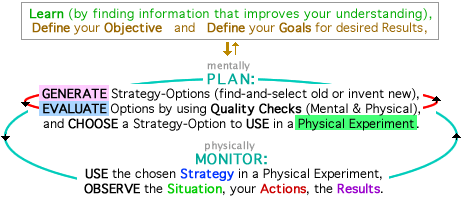
use metacognitive Self-Regulated Learning:  [ iou – during July 17-18, I'll explain why-and-how by using this diagram and by condensing these ideas. ]

 
 put section on right side 


In the HomePage,

Part 1 helps you learn from Your Discoveries (as described above in Basic Overview) and My Explanations (in Expanded Overview) so you will understand my model for problem-solving Design Process.

Part 2 explains how this model can help us achieve worthy educational goals.

Basically, Part 1 is the “what” of my model, then Part 2 answers the “so what ?” about educational benefits.

 
To explain how using Design Process can help us produce educational benefits, Part 2 describes three claims (in Sections A-B-C) and explains the causal connections between these claims:
Wide Scopes of Design Process  (for Activities and Process)  { A }
    ➞  Transfers of Learning  (Across Areas, Through Time)  { in B }
    ➞  Transfer Bridges to Motivate for Personal Education  { in C }.


Part 2  –  Educational Benefits
 
Section A  —  Wide Scopes and Educational Benefits
This section has three sub-sections, to explain why Design Process...  A1) has a Wide Scope for Process,   A2) has a Wide Scope for Activities,   A3) can be educationally beneficial with two main benefits, by helping students learn more (this is examined in A3) and (described in B & C) by producing Transfers of Learning that will help students be more motivated.

There is one Wide Scope (for Activities-and-Process) but sometimes it's useful to think “it has two Wide Scopes, for Activities and for Process” so that's what I'll do in most of A1 and A2.   (and later in B)


A1  –  Design Process has a Wide Scope for Process

An Actions Diagram shows how Design Process uses action-verbs (Define, Generate, Evaluate, Choose, imagine-to-Predict, actualize-and-Observe, compare) to describe the basic Problem-Solving Actions that people actually do while we're Solving Problems.  This gives the model a modular structure and a modular flexibility that lets us combine these simple Thinking Actions to do a wide variety of complex Thinking Projects (with Process that is similar but not identical), often by combining some Actions into Action-Sequences.  By analogy, it's like combining simple Lego Bricks to construct complex Lego Structures;  or how simple atoms combine to form complex molecules.     { The analogy works well because action-verbs and Lego Bricks both produce a modular structure that allows modular flexibility. }     And...


You can get personal “anecdotal evidence” for a Wide Scope that includes Your PS-Actions when you do Recognition Learning by "thinking about the actions you use (naturally & intuitively) while you are solving problems" and recognizing that Your PS-Actions in Everyday Life are The PS-Actions in Design Process so Your Personal Process is a General Process (with Wide Scope) that is Design Process.


Even though I'm confident that using Design Process can be educationally valuable, its utility is limited by an important reality:  all models-for-process have an inherent limitation, because it's impossible to construct any model that is an optimal “best process” for all Problem-Situations.  Therefore a very useful teaching strategy is recognizing that ...

By itself, sometimes Design Process isn't sufficient for an optimal Problem-Solving Process — for a “best Process that produces a best Solution” — so my model should be combined with other models.  For some Problems it's useful to supplement the principles & strategies of Design Process with the principles & strategies of other Models-for-Process.  We can combine models effectively because the modular structure of Design Process forms a foundation that is solid yet flexible so it can “play well” with other models, producing interactions that are synergistically supportive, that make the combination of models better than any single model by itself, to improve Education (by teachers) and Problem Solving (by students).     { exploring the possibilities for productively combining models can be an exciting part of “thinking adventures” in Section C }


iou – soon (during July 17-21) this subsection will conclude by describing strategies for optimizing your wonderful whole-brain system that combines subconscious processing with conscious thinking.  Currently this is one of my two biggest iou's, because it's important and I WANT to do it.


A2  –  Design Process has a Wide Scope for Activities

Why?  It's partly because choosing a broad definition for problem – as any opportunity to make something better, in any area of life produces a Wide Scope.   /   But this definition can be used with many other Models for Problem Solving, so they also can have a Wide Scope for PS-Activities.  It's much more important for a model to have a Wide Scope for PS-Process.  And as explained in A1, Design Process does accurately describe the General Process that is used by most people for most things we do throughout the Wide Scope of our PS-Activities, so the model has a Wide Scope for Activities-and-Process.

What?  You decide to do a Problem-Solving Activity when (quoting from an Overview-Diagram) you "Define a Problem-Solving Goal (for What to Achieve, for What to Make Better).  Your choice can be in...


five categories of PS-Activities:  When you Define your PS-Goal (and thus a PS-Activity) you can choose to design a better product, activity, relationship, and/or strategy (in General Design, aka Design) and/or (in Science-Design, aka Science) a better theory about “how things work in the world” and “what will happen.”   These PS-Goals – extending far beyond traditional “design fields” – include most things you do in life.   /   The main reason I confidently claim "most things" is because you use strategies MANY times each day, including every time you make a decision;  most often it's by asking Time Questions (“what is the best use of my time right now?  and later?”) so you can wisely use your time, and — because “time is the stuff life is made of ” (Ben Franklin) — you will wisely use your life.

other ways to categorize:  A teacher may want to define another set of categories, customized so it's a better fit with their students.  A teacher wants the categories (for PS-Goals) to closely match the life-experiences of students, so they are more likely to recognize the personal relevance of School Activities and be motivated by expecting that “my learning in School-Life will improve my Whole-Life (and I want this), so I want to proactively pursue my own Personal Education in School-Life.”


Despite a common perception, a “problem” doesn't necessarily begin with a bad situation.  When we broadly define a problem as "any opportunity to make something better," the change could be from miserable to adequate, or from pleasant to wonderful.  Each of these is problem solving because things have become better.


Another way to think about the Wide Scopes of Problem Solving is to recognize that you can "make something better" if ...

     with reactive Problem Solving you “make it betterby improving it (to fix it) after it already exists, or

     with proactive Problem Solving you “do it betterthe first time, so there is less need to "fix it" with reactive improving.     { This is the “measure twice, cut once” of carpenters, to take advantage of your only opportunity to make a high-quality first cut. }

You also can make things better — by increasing quality or maintaining quality (by minimizing a decrease of quality) — when...

     with proactive Problem Solving you do positive Actions that (because they are done) will produce beneficial effects, and

     with protective Problem Solving you avoid negative Actions that (if they were done) would produce detrimental effects.

And you can do all of these with your subconscious processing and/or your conscious thinking.


A3  –  Educational Benefits

iou – Soon, July 17-21, I will write this section.  More than any other incomplete “iou section” it will describe important ideas — including

     the benefits of combining Design Process with other Models-for-Process because "it's impossible to construct any model [including Design Process] that is an optimal “best process” for all Problem-Situations" so "in some Problem-Situations it's educationally useful to supplement the principles & strategies of Design Process with the principles & strategies of other Models-for-Process,"  These combination can be an exciting part of Adventures with Thinking.

     teaching Design Process with a sequence of Experiences + Reflections ➞ Principles — and it will link to other sections (in this Basic Overview) with other important ideas about Educational Benefits.


B – The Wide Scopes increase Transfers of Learning.

Design Process (DP) has two Wide Scopes and is logically organized.

These three characteristics of DP let us teach its procedural knowledge (for the skills of Solving Problems, of Designing Solutions to Make Things Better) in ways that will increase Transfers of Learning,* both Across Areas (in School & in Life) and Through Time (Past ➞ Present ➞ Future).

How?  Transfers increase when we teach the procedural knowledge...  

     • in multiple contexts (allowed by DP's Wide Scope for Activities)

     • in a generalized form (allowed by DP's Wide Scope for Process),

     • for deep understanding (promoted by DP's logically organized verbal-and-visual framework).

* We have reasons to be confident — due to evidence-based research and common-sense logic — that these “ways to teach” will increase Transfers of Learning and will be useful for a Goal-Directed Designing of Curriculum & Instruction when we Define Goals for a Curriculum and Design Instruction to achieve these Goals.     { iou – the Expanded Overview will describe one source for the


C – Transfers help students build Motivational Transfer-Bridges.

       We can motivate with Bridges plus Metaphors & Adventures.

When we explain how the Wide Scopes of Design Process let us use methods of teaching that (as described in B) increase Transfers of Learning, we can help students expect Transfers to occur Across Areas (from School-Life into Their Whole-Life) and Through Time (from Past to Present and into Their Future).  They will think “Learning in School is Learning for Lifeand they will build Transfer-Bridges that motivate them to invest effort in proactively pursuing their own Personal Education.  Why?  Because they believe that improving their School Learning will improve their Life Living.   [ iou – July 17, I'll add a few more ideas to this section. ]

More generally, we can help students motivate themselves with...

     Bridges for Transfers of Learning-and-Performing from School into Their Whole-Life and into Their Future-Life.

     Metaphors about Thinking, by explaining how to metacognitively “Drive Your Brain” — and use your Growth Mindset to imagine how exciting it will be when you increase its Performance (like a car's Horsepower & Torque, DriveTrain, Handling Characteristics)* — and “Be CEO of Your Thinking”.     { use analogies: Horsepower & Brainpower, Growth Mindset-plus-Actions for Muscles & Brain }  

     Adventures in Thinking, by inviting them to explore the fascinating world of thinking when they LEARN Thinking Strategies (for effective Cognition-and-Metacognition) and USE Thinking Strategies.     { iou – This is the section that I'm most excited about developing during July, especially by exploring possibilities for understanding cognition-and-metacognition and for combining Design Process with other Models-for-Process. }


Part 2 has some sections (A-B-C above) that directly involve Design Process, and others (below) that are General Principles of Education.


Principles for Motivating Students:   [ iou – I'll develop this later, during July 17-21. ]


Growth Mindset

A student is responding with an optimistic growth mindset – not a fixed mindset – if they ask themself “how well am I doing in this area of life?” and honestly answer “not well enough” BUT they are thinking “not yet” (instead of “not ever”) because they expect that in this area* they can “grow” and improve their abilities, when they invest intelligent effort.  As one way to promote this realistic-and-optimistic view of self, a teacher can explain how a student's "intelligent effort" can include cognitive & metacognitive Thinking Strategies that they now can use more often (and more effectively) than they did in the past, and these strategies will help their future abilities “grow” beyond their past abilities.

* It's "in this area" because a student's attitudes will vary from one area to another, re: their expectations for personal growth.  Ideally a student will develop-and-use a growth mindset in all areas of their life, because...

As you know, promoting a productive growth mindset is one of the best things a teacher can do for their students, to help them thrive in school and in life.


Learning that improves Performing

When you want your best possible Performing Now, you have a Performance Goal.  When you want your best possible Learning Now so you can improve your best possible Performing Later, you have a Learning Goal.  Or you can want some of both, with a combination of Performing-and-Learning.     { For example, compare the main goals for a basketball team during an early-season practice and late-season tournament game. }    { more }

Differences in Goals — whether you want best Learning Now and/or best Performing Now — will affect strategies (of students & teachers) in ways that are important and complex.


iou – during July 17-21, I will condense sections in the HomePage to make the following sections for this Basic Overview and the Expanded Overview:


Three Kinds of Improvising – for problem solving, conversation, music


Goal-Directed Designing of Curriculum & Instruction for Optimal Whole-Person Education that helps us improve Diversity & Equity in Education to “open up the options” for all students, so each will say “yes, I can do this” for a wider variety of subject-options in school and career-options in life.


iou – during mid-July, I will write a brief “conclusion” for the Basic Overview.


introduction for Expanded Overview:   iou – during July 17-21, I'll finish writing this introduction — it will be a reminder of ideas from the Page Introduction — by explaining how the Expanded Overview lets you expand your knowledge (by providing useful explanations and extra ideas) and (with links to corresponding sections in the HomePage) extend your explorations to develop understandings that are wider-and-deeper.


Viewing Tips (Part 3):  If necessary, put this section on the right side (because its links open on the left side, as explained in the main Viewing Tips) or make a Split-Window Pair.

Then you'll have the option of seeing both versions of a section — in the Basic Overview (BO) on left side, and Expanded Overview (EO) on right side — if you "click { EO then BO }",  i.e. if you first click "EO" to put this Expanded Overview on right side, and then click "BO" to put the Basic Overview on left side.  This can be useful because you can first read the short BO to form a mental framework that helps you understand the details in the longer EO.

To test this 2-click process, use the "{ EO then BO }" below.     { Some sections will have links for "{ EO then BO }" in case you've used links that put other things (instead of the Basic Overview) into the left-side window.  And you continue reading this right-side EO you can keep the Overviews in-synch by scrolling downward in the left-side BO. }


As explained above, click { EO then BO }


Expanded Overview
We can help students learn more from
their experiences with Problem Solving,
and be more motivated to learn when they
build Transfer-Bridges from School into Life.
 
How can we help students learn more from their experiences, and be more motivated to learn?  You already know many ways, and this Overview explains how you can supplement your own teaching methods by using my model for Design Process, for the Design-Thinking Process that is Problem-Solving Process.     { if necessary, put section on right side }
 

It's easier to make progress toward both educational goals – more learning and more motivation – because my model for Problem Solving (PS) has two Wide Scopes, for what students do (in their PS-Activities) and how they do it (with their PS-Process).  But these two scopes are closely related, and sometimes it's more useful to think “it has one Wide Scope for Activities-and-Process.

Why?  We have logical reasons to conclude that my model for Problem-Solving Process (usually I call it Design Process) has these two Wide Scopes (that form one Wide Scope) because...

     we can choose to use an educationally-valuable broad definition of problem — it's any opportunity to make something better, in any area of life — so Problem-Solving Activities include most things people do in life;  students are problem solving (verb) whenever they are trying to make something better, and they are a problem solver (noun) whenever they do make something better. 
     But a more important reason is that ...
     most people use a similar (but not identical) General PS-Process for most things we do in life, for most of our PS-Activities,
     AND this General Process is described by Design Process in ways that are accurate (and are educationally beneficial),
         so this model has a single Wide Scope for Activities-and-Process, or
         we can think “it has two Wide Scopes, for Activities and for Process.


 put section on right side 

understand Design Process by

learning from My Explanations


It can be fun-and-effective to learn from Your Discoveries and My Explanations.   Each “way to learn” offers benefits, so I encourage using both.  After you've done some Discovery Learning (in the Basic Overview) and you've found the three Essential Action-Sequences, in this section you also can learn from My Explanations.

If necessary, and if you want to see both Overviews — it's especially interesting for this section, because instead of just “expanding the information” (as in other pairs-of-sections) there is a contrast between the methods of learning, with Discoveries (in Basic Overview) and Explanations (in Expanded Overview) — click { EO then BO }.


This section lets you compare Your Discoveries with My Explanations.

When you study the diagram and think about the actions you use (naturally & intuitively) while you are solving problems, you will recognize that The Problem-Solving Actions in Design Process are Your Problem-Solving Actions in Your Everyday Living and therefore that Design Process is Your Process.

the complete diagram for Design ProcessTo confirm this Recognition Learning, study the Complete Diagram (put it on left side with this link) and ask Recognition-Questions about three Essential Action-Sequences:  Do I often ...
      use Cycles of Design by Generating Options and Evaluating Options?     { each Design Cycle is Action-Sequence #1 }

      use Quality Checks to Evaluate an Option by comparing Predictions (of its Actual Characteristics) with Goal-Criteria (for Desired Characteristics)?  or by comparing Predictions with Goal-Criteria,  or by comparing Predictions with Observations?     { each comparison – in a "      Check" – is one variation of Action-Sequence #2 }

      use Guided Generation when Evaluation (in a Quality Check) guides me while I'm Revising an Old Option to Generate a New Option and complete a Design Cycle?     { each Guided Generation is an Action-Sequence #3 }


Also study the Top Text and Bottom Text to get a “big-picture overview” of Design Process, to see the PS-Actions that you do before, during, and after you do the PS-Actions of Generating Options and Evaluating Options.  You first (before Generating & Evaluating) Learn and Define & Define, then (during) you "continue to Evaluate Options" until you finally "Choose an Option" to be the Problem-Solution, and (after) you "Actualize This Option with Actions."


Here is extra information about each kind of Action-Sequence.

for Cycles of Design:  With different timings, you can simply alternate the Actions in Action-Sequence #1, so it's Generate-Evaluate-Generate-Evaluate-...;  or (as described here) you can Ideate by Generating Multiple Options, and then Evaluate Multiple Options.


a Quality Check asks The Design Question:  With a Predictions-Based Quality Check you're asking The Design Question – “how high is the Quality?” (with Quality defined by your Goal-Criteria) – when you compare Predictions with Goal-Criteria and ask “how close is the match?”   Why can you define either question – “how high” or “how close” or both – as The Design Question(s)?    /    In this Quality Check you compare Predictions (of Actual Characteristics) with Goal-Criteria (for Desired Characteristics);  therefore, "Define Goal-Criteria... for [Desired] Characteristics of a Solution" is a very important Action.    { terms: Goal Criteria & GOALS }     /    You also can do an Observations-Based Quality Check by comparing Observations with Goal-Criteria, and this is a second variation of Action-Sequence #2.   Or in a third variation, ...

a Reality Check asks The Science Question:  With a Reality Check you're asking The Science Question – “am I surprised?” – when you compare Predictions with Observations.   /   You can do a Reality Check during a Science Project (for Science-Design, aka Science) when your Main Goal is to test a Theory so you intentionally use a Reality Check.  Or maybe during a Design Project (for General Design, aka Design) you unintentionally do a Reality Check when you notice a mis-match between Predictions & Observations, so you answer “yes, I am surprised.”   Reality Checks are used in three contexts, in Research Science (intentionally for a Science Project) and in Everyday Science that includes (maybe unintentionally) uses during a Design Project.


Design-and-Science:  When 3 Elements (P&O, G) are used in 3 Comparisons, this logically produces the Evaluations that we intuitively use for Design (in 2 Quality Checks) and for Science (in 1 Reality Check).  This logical integrating of Design-with-Science in the diagram* will help students understand how to improve the logical integrating of Design-with-Science in their thinking when they internalize this logic during their experiences with Problem Solving, especially when the focus is General Design.    /   * Design and Science are logically integrated in the verbal-and-visual structure of my model for Design Process;  by contrast, most other models-for-process describe either Design or Science, but not both in the same model.    /    In classroom instruction, a teacher can describe relationships between Design (that includes Engineering as a special kind of Design) and Science.    /    options for terms:  You can choose to use (or not use) some terms as approximate synonyms — Science ≈ Science-Design;  and General Design ≈ Design ≈ Engineering Design ≈ Engineering;  and The Design Question ≈ The Engineering Question — or to use other terms.


Action Sequences

Why?  These are used because they are useful.  The three Essential Action-Sequences tend to occur naturally when you are Coordinating Your Process (by deciding “what to do next”) and you decide that a particular Sequence-of-Actions will help you make progress toward Solving the Problem.  These common Sequences "tend to occur naturally" so you don't need to “learn” them;  instead you can just recognize Sequences and use them.

What happens first ?  An “isolation diagram” (put on left side) makes it easier to see the version of Essential Action-Sequence #2 that is most common in our conscious Problem-Solving Process.  Notice how each Action leads to the next Action:  after you Generate multiple options you Choose an Option so you can Evaluate it when you DO a Mental Experiment by imagining a Situation to make a Prediction that you compare with Goal-Criteria (GOALS) in a Predictions-Based Quality Check.

What happens next ?  Then the Sequence can continue IF you do the Actions in the region that is lightly shaded to show that it's optional, although it's often done.  In this Essential Action-Sequence #3, you follow the left-side arrow upward (compare ➞ usereviseGenerate) to complete a Design Cycle by using Guided Generation.  How?  When you compare Predictions with Goal-Criteria and ask “what inadequacy is causing the mismatches, and what revisions will improve the Option?” your Evaluation is guiding your Generation of a better New Option.     { the three Essential Action-Sequences }


Experiments and Experiences

With a broad definition of Experiment you can recognize – because Experiments produce Experiences, and you have Experiences – that you Do Experiments.  I claim that "many (but not all) of your everyday Experiences happen due to ‘Experiments’ that are done by yourself or by others."  I'll say a few things about this claim in the context of Designing Your Life.


using Design Process can help students

get more Problem-Solving Experiences,

and learn more from these Experiences

with metacognitive Thinking Strategies.


A useful definition of education is learning from experience.  Students will have better education, with more learning, when we help them effectively use...

two ways to learn more:  Students can learn more in two related ways, when they GET MORE PS-Experiences, and they LEARN MORE from these PS-Experiences by using my model for Design Process – i.e. for Problem-Solving Process plus other models (from d.school of Stanford,...) to promote metacognitive Thinking Strategies.    /    educational benefits:  Abundant research shows that when students use metacognition, this is highly effective for helping them improve their academic skills — in many ways (to boost their Learning and Performing) in most contexts, including their scores on standardized exams — and their social-emotional skills.

differences in the two ways:  My model can directly help students LEARN MORE from Experiences, by promoting metacognition.  But its value is indirect for helping them GET MORE Experiences, because they will recognize* that most of their Experiences (in all areas of life) are PS-Experiences so they will be metacognively aware more often, and this frequent metacognition will help them LEARN MORE.     { * A teacher can promote this recognition by saying “the Wide Scope of Design Process includes most things you do” and by sometimes calling attention to the Wide Scope with reminders – during a wide variety of School Activities – that “what you're doing now is Problem Solving.” }


Cognitive-and-Metacognitive Thinking Strategies


How?  The essential foundation of metacognition is for you (or a student) to “observe your thinking,” but you also can think about (reflect on) and evaluate so you can regulate (adjust) as in the Self-Regulation of Self-Regulated Learning.  In five levels of metacognition, your Metacognitive Actions can be...

      0 )   none,

      1 )   observe,

      2 )   observe  +  ( think about ),

     3a)    observe  +  ( think about  &  evaluate ),

     3b)    observe  +  ( think about  &  evaluate-and-regulate ).


You can Regulate your Thinking (and Feeling)* — to produce Regulation by Metacognition — with the intention of Achieving a Goal, with Goal-Oriented Metacognition.     { * Many educators think it's useful for students to Regulate their Thinking-AND-Feeling because this can make their life better in a wide range of important ways by improving their academic skills AND social-emotional skills. }

A process of Regulation by Metacognition will be more skillfully effective when you do Regulation of Metacognition.  Why?  Because you sometimes will decide to stimulate higher-quality Learning by using metacognition of a particular type, in a particular way (re: its amount, timing,...).  But at other times you will “go with the flow” by just thinking-and-doing (instead of thinking about thinking) to allow higher-quality Learning by avoiding metacognition (at Level 0) or by only observing (Level 1), or by using only 2 or 3a or 3b.


using Design Process for Cognition-and-Metacognition

How?  Three ways are by Coordinating your Problem-Solving Process and by Self-Questioning (as with a Metacognitive Checklist) and doing Self-Regulated Learning.  Each of these combines cognition with metacognition, therefore is cognition-and-metacognition.


coordinate your process:  Design Process can help you (and your students) improve your strategies for coordinating your problem-solving process when you ask “what is the best way to make progress in my process?” and decide “what to do next” and do this Action.  How?  During a skillful Coordinating of Process with the goal of making effective Action-Decisions, you combine cognitive-and-metacognitive awareness of Your Situation (of “where you are” in your process, and “where you want to go”) with conditional knowledge of your Action-Options (by knowing the functions that each Action can do, and the conditions when this Action can be useful).     { On average, this skill is more cognition-focused than the next two skills. }


Scientists have found that two effective strategies for using metacognition are self-questioning and (especially beneficial) Self-Regulated Learning, and that combining both is more effective than either by itself.

use metacognitive self-questioning:  When I've made a mistake and then asked “why?” so I could learn from the experience for self-education, my answer often included “ineffective process” because I had done some Problem-Solving Action(s) ineffectively, and sometimes had not even done the Action(s).  Often it would have been easy to “do it better” and avoid the mistake, with better Problem-Solving Process.  Therefore — in an effort to reduce mistakes and to grow by learning from experience — I have found it beneficial to develop-and-use a Metacognitive Checklist for Problem-Solving Actions, to guide my Self-Questioning.  And others (you, students,...) also can benefit from this habit.    /    proactivity and consistency:  When you develop the habit of using metacognition proactively (with a Checklist for Self-Questioning, and in other ways) by often “paying attention” throughout your day, this will help you learn-and-perform more consistently so you can “do things better {in your present moments}” instead of thinking “oops” and asking “why {during past moments} did I make the mistake?”     { how to develop a checklist }

use metacognitive Self-Regulated Learning:   [ iou – I'll write this section during July 17-21, based on this Diagram-for-SRL. ]


iou – during July 17-21, I will write an intro-transition to connect what is above (about Learning More) with what's below (about educational benefits that include More Motivation) because these two goals are stated in the Overview-Title.


In the HomePage,

    Part 1 helps you learn from Your Discoveries (as described above) and My Explanations, so you will understand my model for problem-solving Design Process.

    Part 2 explains how this model can help us achieve worthy educational goals.

    Basically, Part 1 is the “what” of my model, then Part 2 answers the “so what ?” about educational benefits.


To explain how using Design Process can help us produce educational benefits, Part 2 describes three claims (in Sections A-B-C) and explains the causal connections between these claims:

     Wide Scopes of Design Process  (for Activities & Process)  { A }

     ➞  Transfers of Learning  (Across Areas, Through Time)  { in B }

     ➞  Transfer Bridges to Motivate for Personal Education  { in C }.


your options:  You can read whatever looks interesting;  and after reading in the Basic Overview you already know the basic ideas for each topic.  You can read sections in order, or click a link — to open a section, and then (if necessary, put section on right side* — for

Section A with SubSections A1 (Wide Scope for Process)  or  A2 (Wide Scope for Activities)  or  A3 (Educational Benefits) 

Section B (Wide Scopes ➞ Transfers of Learning) 

Section C (Transfers ➞ Transfer-Bridges for Motivation) 


General Principles for Education:  Motivating StudentsGrowth MindsetLearning that improves Performing  —  Three Kinds of ImprovisingGoal-Directed Designing of Curriculum & Instruction for Optimal Whole-Person EducationDiversity & Equity in Education.

Those sections are below.  Above, the sections are  Reasons for the Wide ScopesUnderstanding The ModelGet More Experiences and Learn More from ExperiencesPart 1 & Part 2 of the HomePage.


* And if necessary, make a Split-Window Pair.


Part 2  –  Educational Benefits
 
Section A  —  Wide Scopes and Educational Benefits
This section has three sub-sections, to explain why Design Process...  A1) has a Wide Scope for Process,   A2) has a Wide Scope for Activities,   A3) can be educationally beneficial with two main benefits, by helping students learn more (this is examined in A3) and (described in B & C) by producing Transfers of Learning that will help students be more motivated.
 
It will be easier to understand each subsection in this Expanded Overview if you begin with a recent reminder of “the big picture” by first reading the Basic Overview, when (as explained in the third Tips for Viewing) you click { EO then BO } and then scroll each Overview down to A1.


A1  –  Design Process has a Wide Scope for Process

Why?  It's mainly due to the model's modular structure — because each Action Diagram uses action-verbs (Generate, Choose, Evaluate, DO, imagine to make, compare,...) to describe the PS-Actions typically used by people when we are Solving Problems — and this modular structure gives the model a modular flexibility that lets it be used to accurately describe the General Process that people use for most of our PS-Activities, for most things we do in life.   How?  Analogous to the way modular flexibility lets you combine simple Lego Bricks to form many kinds of Lego Structures (and the modular flexibility of atoms lets them naturally combine to form many kinds of molecules), the modular flexibility of Design Process lets you combine simple Problem-Solving Actions (Thinking Actions) to construct many variations of a Problem-Solving Process, often by combining several Actions to form different Action-Sequences.

similar but not identical :  There are "many variations" because – for different people and different PS-Activities – the PS-Process will be similar but not identical, because the General Process will be customized by a Specific Person to solve a Specific Problem.

One way to understand the Wide Scope (for Activities-and-Process) is to logically know “why” by seeing how the modular structure allows modular flexibility so Design Process has a Wide Scope for PS-Process that lets it describe "what we do" in a wide variety of PS-Activities, throughout that Wide Scope.

And here is another way:


To get personal “anecdotal evidence” for a Wide Scope that includes Your PS-Actions, you can do Recognition Learning by "thinking about the actions you use (naturally & intuitively) while you are Solving Problems" by Making Things Better in many areas of your life.  While you're doing this you will recognize that Your PS-Actions in Everyday Life are The PS-Actions in Design Process so Your Personal Process is a General Process (with Wide Scope) that is Design Process.   Why?  It's due to the general similarity-of-process among people (for most things we do) AND because this General Process is accurately described by Design Process.  But...


Even though I'm confident that using Design Process can be educationally valuable, its utility is limited by an important reality:  all models-for-process have an inherent limitation, because it's impossible to construct any model that is an optimal “best process” for all Problem-Situations.  Therefore, teachers should combine models in their Education for Problem Solving, and students should learn how to combine models in their Problem-Solving Process.

Design Process accurately describes “the basic General Process” that is used by most people use for solving most Problems.  But in some Problem-Situations, by itself my model isn't sufficient for “an optimal Specific Process” — for a “best Process that produces a best Solution” for This Specific Problem — so my model should be combined with other models.  For some Problems it's useful to supplement the principles & strategies of Design Process with the principles & strategies of other Models-for-Process.  We can effectively combine models because the modular structure of Design Process forms a foundation that is solid yet flexible so it can “play well” with other models, allowing interactions that are synergistically supportive, that make the combination of models better than any single model by itself.  This can improve Education (by teachers, and Problem Solving by students.     { exploring the possibilities for productively combining models can be an exciting aspect of “thinking adventures” in Section C }


iou – during July 17-21, I will be developing-and-revising the rest of this Expanded Overview (and the Basic Overview) so both will continue growing & improving.


iou – Below here, maybe I'll add some semi-developed sections, so you can see the rough-draft ideas that during July 17-21 will be revised and then moved out of this “brown box” and into the Overviews.   {the brown color shows that the sections need to be revised}    /   While doing this I will return to a "writing strategy" that I used earlier, and should have continued using;  I will be developing each section as a Pair-of-Sections to use for the Pair-of-Overviews.


Appendix
 
iou – I'll be gradually developing this during mid-July.


Here are some of the ideas that might be added:

examples of Experiments:  Many of your everyday Eperiences are Mental Experiments (when you're imagining “what will happen”) or involve Physical Experiments (when your Experiencing-with-Observations occurs due to actions by yourself or others, or just because of a situation-in-life).    /   In one form of creative experimenting, an effective way to improve your musical improvising is to do musical experiments (try new musical ideas) that produce new musical experiences in a creative process of do-listen-learn.


terms:  Why am I treating Goal-Criteria and GOALS as synonyms?  One reason is visually-pragmatic because "GOALS" is better for diagrams.  It also has linguistic advantages because it's more natural for students to talk about "my goals" instead of "my goal-criteria."  Because "goals" has two meanings, there could be some confusion, but a teacher can describe the similarities & differences between Goals (for Defining a Problem) and GOALS (for a desirable Problem-Solution) and why Goal-Criteria is more precise but GOALS also is ok, and offers some benefits.   [ iou – this will be continued in late July by more-clearly explaining the pros & cons of different terms, and choices of other terms.]


iou – I'll say a little about "how to develop-and-use a checklist" during late-July.


about me – Here is a “networking bio” :

I'm an enthusiastic educator (with a PhD in C & I  from U of WI ) who wants to find co-enthusiasts so we can share ideas.  How?  You can learn from me (in this website) and I can learn from you (if you contact me) and then we'll be learning from each other by discussing my ideas & your ideas, and your goals.

I'm especially excited about helping students improve their skills in problem-solving Design Thinking, and I've developed this comprehensive website about Education for Problem Solving.  Although it's based on solid principles of learning & teaching, I don't have any direct experience with teaching K-12 so I need help from fellow educators who have better understandings of K-12 students, teachers, and culture.     { also – In my main edu-bio you will find more about me (and you) and why our combining of similarities-and-differences can help us co-create better education, plus how my model began during a PhD project and “having fun with music” and a full bio about my life on a road less traveled. }

But I do have a variety of teaching experiences with chemistry (instructor for U of Wisconsin-Madison) and  physics,  math,  ESL,  problem solving  –  plus the skills of  tennis,  juggling,  ballroom dancing,  music improvising  –  and I've enjoyed all.

I have degrees in Chemistry and History of Science, plus Curriculum & Instruction that is my favorite, is the central hub (with many fascinating spokes) for continuing adventures with lifelong learning.  It's a strong motivation for action because improving our education — by designing better ways to teach & learn, so we can improve our thinking and doing — is one of the most important things we can do.  And it's fun!


Copyright © 1978-2026 by Craig Rusbult,  All Rights Reserved.